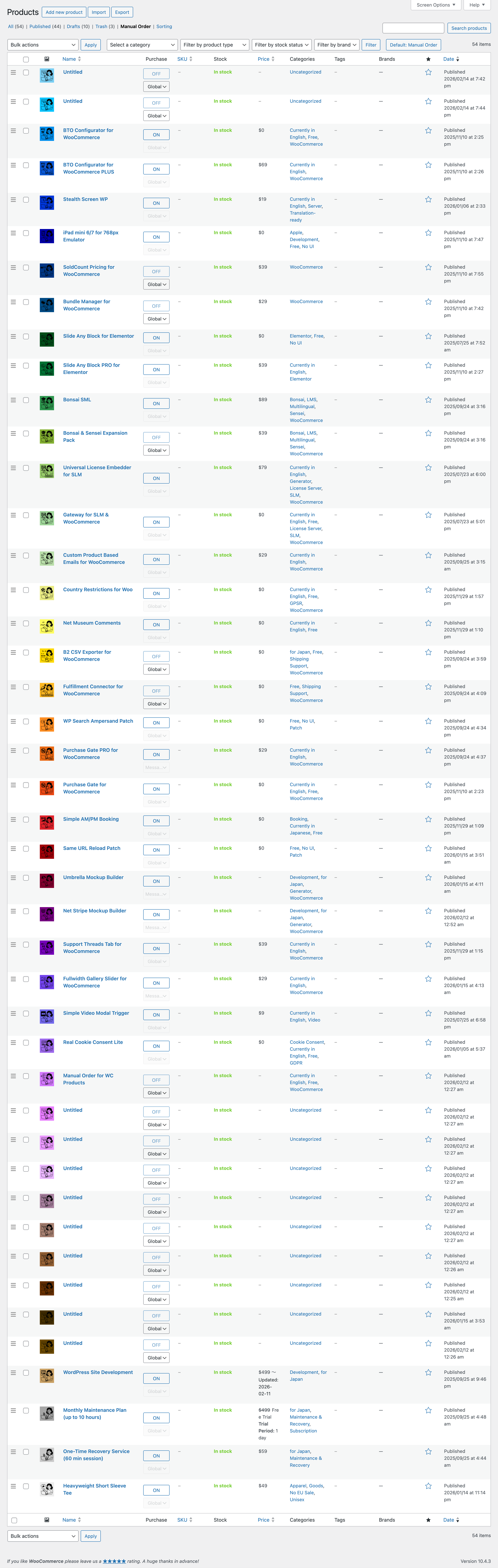
This plugin adds a manual ordering mode to the WooCommerce Products admin list, allowing you to arrange items in any order you like.
When you move a product via drag & drop, its new position is saved automatically and immediately. There’s no risk of losing your carefully arranged order by forgetting to click a “Save” button.
Normally, the Products page opens with the “All Products” view selected. This plugin also provides an option to keep the manual ordering mode active by default, so you can manage your products in your preferred order at all times.Read More
It features a 100% native-looking interface, as if it had always been part of WooCommerce. You won’t notice anything unfamiliar on the screen you use every day.
Currently, the plugin is available in English only, but no configuration is required. In fact, it uses only the following three interface strings:
Mode tab name: Manual Order
Toggle button states: Default: Manual Order / Default: Standard View
This feature applies only to the admin interface and does not affect the product order on the frontend.
Collapse



Reviews
There are no reviews yet.